Why I Built Another File Converter (Probably a Stupid Idea)
There are a million file converters on the internet. Here's why I built one anyway — the 10-year backstory, Vue islands on Razor Pages, real-time SSE progress, and an AI-agent-friendly API.
Originally published on dev.to
There are a million file converters on the internet. And I built one anyway.
The Backstory
About 10 years ago I was working at a design agency in Adelaide and we used TinyPNG constantly. Drop your PNGs, get them back smaller, done. I loved the simplicity of it and always thought the same approach would work for file conversion - find the format pairing you need, drag your files in, see per-file progress in real time, get a batch ZIP at the end.
A few years back I built a .NET API called ConvertX.to - 90+ converters, mostly a portfolio project. Then I let the domain lapse. Life happened. When I finally went to build the frontend I’d always wanted, the .fast gTLD had just launched. I checked convert.fast. Available. Bought it on the spot, along with about 70 other .fast domains.
What I Actually Built
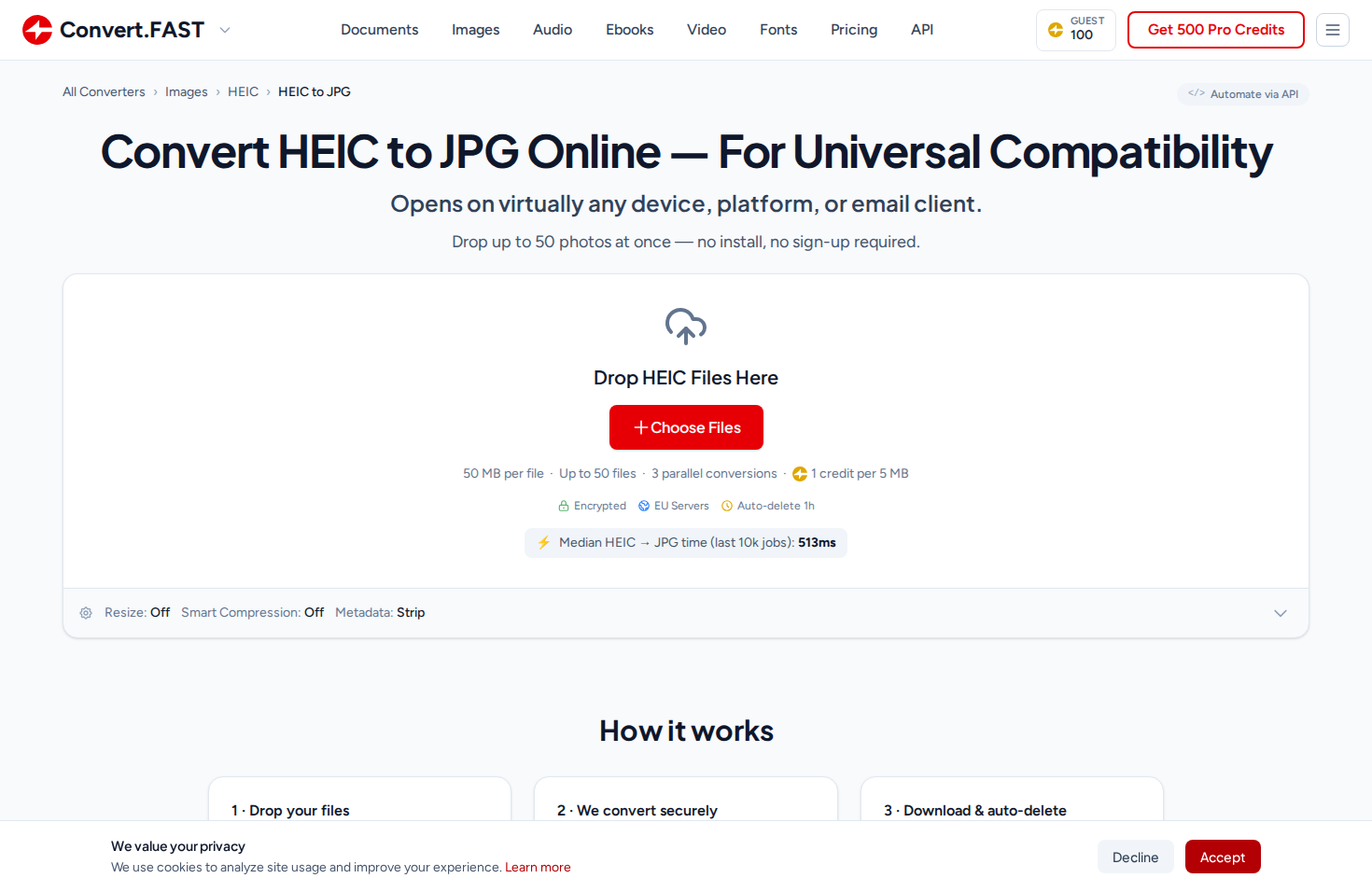
I spent about two months building and shipping the web UI in December 2025. The architecture behind it is a shared accounts system on accounts.tools.fast - an OpenIddict SSO provider across the whole network. One login, shared credit wallet, unified identity. The idea is I can ship different tools quickly behind the same account, with a unified API that gets more valuable as more tools join the network.
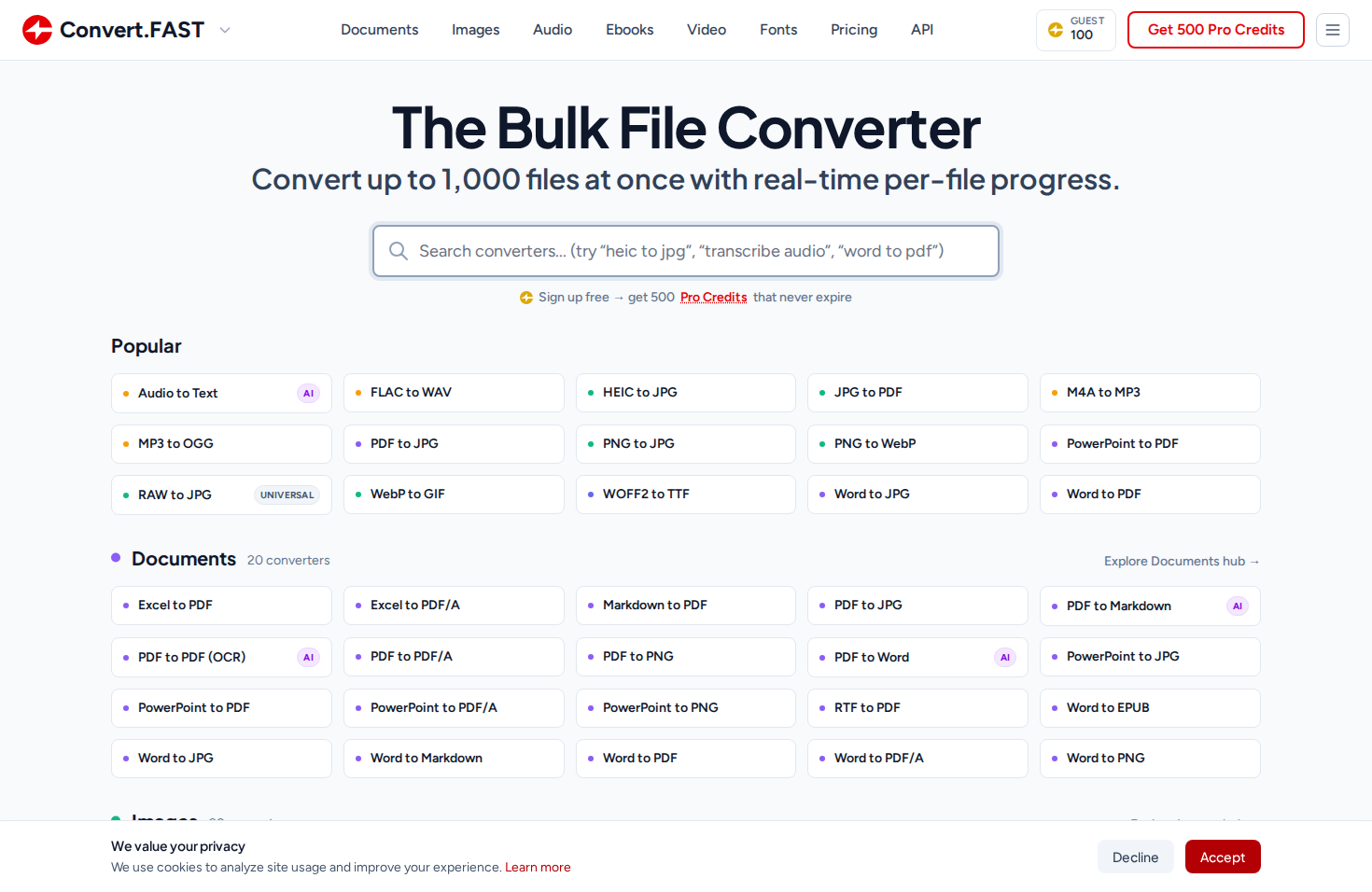
The converter handles images, documents, audio, video, ebooks, fonts, and animations. The UX is deliberately simple: find your format pair, drop your files, watch the per-file progress, download individually or as a batch ZIP. The TinyPNG ethos, applied to everything.
Is This a Stupid Idea?
I ask myself this regularly. CloudConvert, Zamzar, Convertio - well-funded, well-established, years of SEO authority. Competing with them sounds insane. The domain alone is $500 USD/year.
Years ago I built a Chromebook classroom monitoring tool that grew to $10K ARR through word of mouth in a handful of primary schools in Adelaide. Then I got distracted by other things and shut it down. That decision haunts me. I had something real and I took it for granted - didn’t put in the work to grow it when the opportunity was there. My son just turned one. I turn 37 this year. I’ve told myself I have until I’m 40 to give this everything I’ve got - three years of genuine effort - and if it’s still not working, I can walk away knowing I actually tried this time.
The bet I’m making is a long one - three to five years minimum. The .fast network approach (one login, shared credits, a unified API across conversion, compression, and eventually more tools) creates something more valuable than any single converter site, but only if people actually find it. And that’s the hard part. SEO is a slow grind when you’re competing against domains with a decade of authority, and it’s getting harder - half of Google’s first page is sponsored results now, AI overviews are eating clicks, and the rules change every few months. Word of mouth takes even longer. There’s a free tier with 500 credits and no credit card required. The pricing page has the full breakdown.
I might be wrong. This might never get enough traffic to justify the domain costs, let alone the engineering time. But I’ve always wanted to build this, and so far I’m enjoying the process. Here’s the engineering behind it.
The Frontend: Vue Islands on Razor Pages
I usually write React - I’d just finished building BeamIt.to on TanStack Start. But for this project I wanted a single language across the full stack. Razor Pages (ASP.NET’s server-rendered templating) turned out to work really well - real HTML that Google can crawl, fast first paint, no JavaScript required for the initial page load.
That worked great until I needed interactivity. The drag-and-drop uploader, real-time progress bars, batch queue management - managing that much UI state without a framework was going to be a maintenance nightmare.
So I came up with a Vue island system (demonstration of the technique on GitHub). Each converter page is a Razor Page that server-renders the exact HTML markup that the converter UI will display. Then a tiny Vue 3 app hydrates against that specific <div> - and because the server-rendered HTML matches what Vue would render, it’s essentially a no-op on the DOM. Vue mounts without the user noticing anything. No flash of content, no layout shift. Every tool page is its own little Vue app, with shared core chunks split out by Vite for download optimization.
This approach would work equally well with PHP + Vue, or Django + Vue, or any server-rendered framework. The key insight is: let the server own the SEO-critical markup, let Vue own the interactivity, and make sure they agree on what the HTML looks like.
The core of the system is a single FileConverter.vue component - about 3,700 lines of Vue 3 Composition API. It’s the engine behind all 165+ converters. Every converter wraps it with a thin config layer.
Real-Time Per-File Progress via SSE
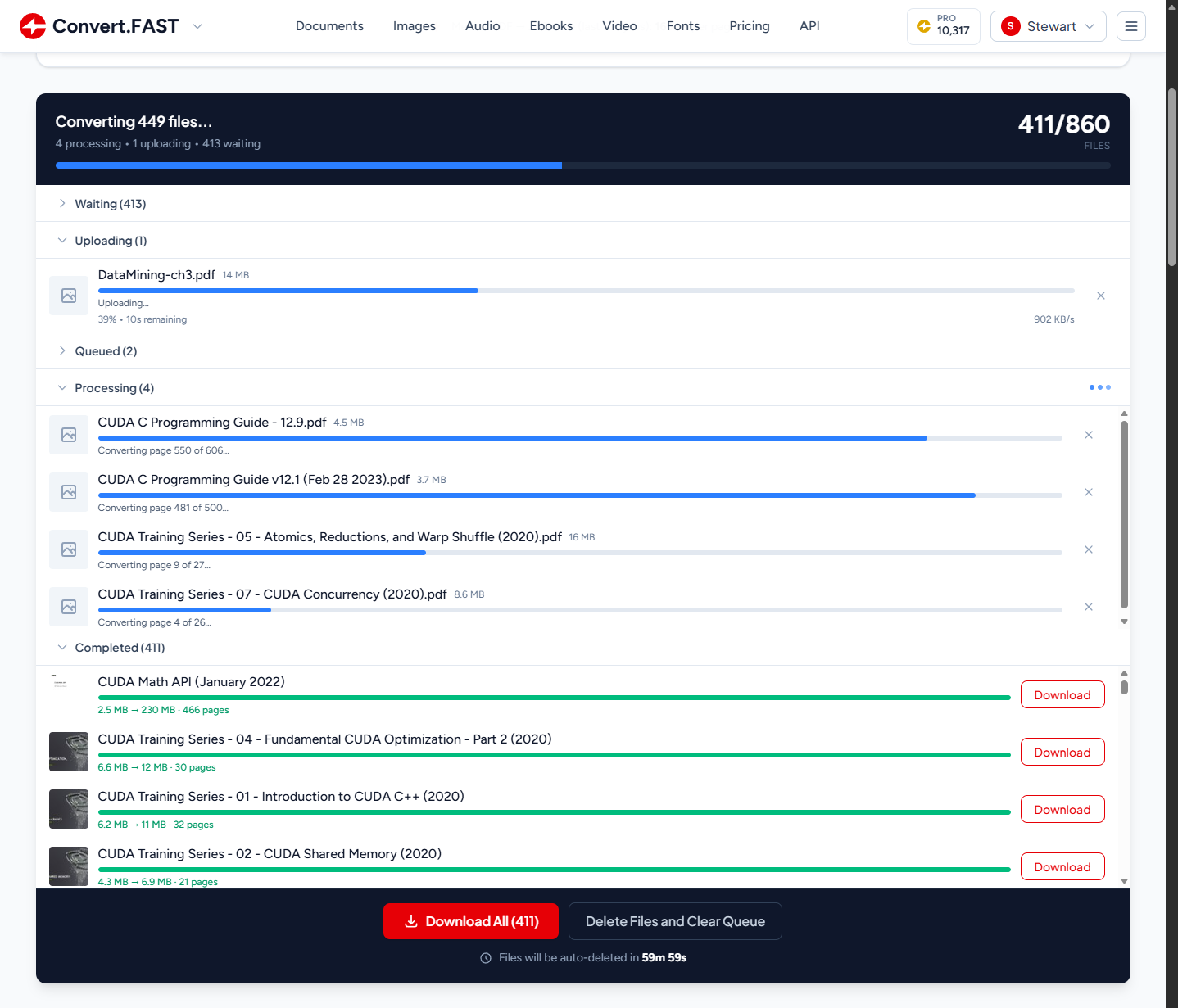
When you upload files, the frontend opens a Server-Sent Events connection to the batch endpoint. Every file in the queue gets its own live progress bar, updated independently in real time.
For converters where we control the processing pipeline - which is most of them - we report genuinely granular progress. Our image library bridges report per-frame progress for animated formats (GIF-to-WebP shows “Converting frame 42/110…”). Document converters report per-page progress (PDF-to-JPG shows “Converting page 550 of 606…”). Audio converters report per-second progress based on transcription speed.
For a 200-file batch, you see 200 individual progress bars all ticking independently - uploading, queued, processing, and completed files organized into collapsible sections.
The Honest Tradeoff: Asymptotic Progress
Not everything has progress hooks though. OCR engines, external APIs like Whisper for transcription, CLI tools like Pandoc - they’re black boxes. You hand them a file and wait. Without intervention, the progress bar sits at 35% for 30 seconds and users think it’s broken.
I didn’t have this at launch. I shipped without it, and then watched Microsoft Clarity session recordings of real users looking visibly confused when their conversion hit 50% and just… sat there. You could see them hovering over the progress bar, scrolling up and down, some refreshing the page entirely. That was enough motivation.
So I built an asymptotic progress system. The server calculates an ETA based on input characteristics (page count, audio duration, file size) and tells the frontend via SSE: “Interpolate smoothly from 20% toward 75% over approximately 30 seconds.” The frontend uses an exponential decay curve - progress = from + (ceiling - from) * (1 - e^(-elapsed/tau)) - that accelerates quickly then decelerates as it approaches the target. Crucially, it never reaches the target until the server confirms completion.
It’s honestly a beautiful lie. We’re faking smooth progress over operations where we genuinely have no idea how far along they are. We just know roughly how long they should take. But users don’t need accurate progress - they need reassurance. A bar that smoothly approaches 89% and then snaps to complete is far better UX than one that sits frozen at 35% for half a minute.
The API
Not a “here’s a POST endpoint, good luck” kind of API. I wanted extensive documentation, self-describing discovery, and copy-to-clipboard on everything so integration is as low-friction as possible.
Three Requests
At minimum it’s submit, check status, download:
API_KEY="fast_prod_your_key_here"

curl -sS -X POST "https://api.tools.fast/convert" \
  -H "X-Fast-Api-Key: $API_KEY" \
  -F "file=@photo.heic" \
  -F "targetFormat=jpg"
{
"id": "019c56454f8b755996c45a4874a1f3f6",
"status": "Queued",
"creditCost": 1
}Poll for completion at GET /convert/job/{id}, then download at GET /convert/job/{id}/download. That’s it - three requests. If you don’t want to poll, there are webhooks with Stripe-style HMAC-SHA256 signatures.
Discovery-First Design
I always found it annoying when I had to dig through docs to figure out if an API supports a specific format pair. So the API is self-describing:
# What can I convert HEIC to?
curl -sS "https://api.tools.fast/convert/conversions/heic" \
  -H "X-Fast-Api-Key: $API_KEY"

# All image conversions
curl -sS "https://api.tools.fast/convert/conversions/images" \
  -H "X-Fast-Api-Key: $API_KEY"

# What converts TO PDF?
curl -sS "https://api.tools.fast/convert/conversions/to/pdf" \
  -H "X-Fast-Api-Key: $API_KEY"
The response includes everything: supported formats, max file sizes, credit costs, costing strategy, and concurrency limits. No guessing.
Every converter also publishes its options as a JSON Schema, queryable at /convert/schema/{from}/{to}. Things like resize presets, compression modes, OCR, metadata stripping - it’s all machine-readable, so you can build dynamic UIs or validate options before submitting.
There are currently 165 unique conversion pairings, and we keep adding more. And because each converter has its own page, they naturally become discoverable - every converter is a landing page.
Built for AI Agents
This is the part I’m probably most excited about. The entire API documentation is Markdown-based and published as downloadable files - designed from the ground up to be fed into an AI agent’s context window.
There’s a For AI Agents page with a copy-paste prompt you can give to Claude Code, Codex, OpenCode, or any AI coding assistant:
Download the Convert.FAST skill and reference docs, then use them to complete my task:

curl -fsSL https://convert.fast/SKILL.md -o SKILL.md
mkdir -p reference && curl -fsSL https://convert.fast/api/docs.md -o reference/docs.md
curl -fsSL https://convert.fast/convert.fast.sh -o convert.fast.sh && chmod +x convert.fast.sh

Read SKILL.md to understand how to use the Convert.FAST API.
The agent downloads a skill file (~2k tokens), the core API reference (~18k tokens), and a CLI wrapper script. That’s everything it needs to convert files on your behalf. The CLI wrapper handles the submit-poll-download loop in a single command:
./convert.fast.sh photo.heic jpg
./convert.fast.sh document.pdf docx
./convert.fast.sh scan.pdf docx output.docx '{"ocr":{"enabled":true}}'
I built the docs this way because I use AI coding agents every day and the integration experience with most APIs is terrible - the agent has to scrape docs pages, guess at endpoints, and hallucinate request formats. I wanted mine to be different: download three files, read the skill, you’re done. I tested this by onboarding a Claude Code agent with the prompt above - it converted files autonomously with no hand-holding.
What’s Next
The next site in the network is pdf.fast - my take on iLovePDF. A visual PDF toolkit: merge, split, compress, OCR, watermark. I’m also working on a free offline desktop compression app - right-click images, documents, and PDFs and they get optimized. Think the old Windows Image Resizer before PowerToys absorbed it.
Every format I support on the web is available through the API - same processing pipeline, same quality defaults. It’s well-tested, but there are definitely edge cases I haven’t hit yet, and I’m sure someone will find a format combination that breaks in a way I didn’t anticipate.
If you try it out, I’d love to hear what breaks - or tell me the format pair you need that I don’t have yet. Drop a comment.
Links:
- API docs
- Sign up (500 free credits, no credit card)
- The web tool
- pdf.fast (coming soon)
- ConvertX.to (the original .NET portfolio project)